


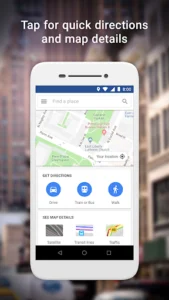






When connectivity is a challenge or device resources are scarce, finding your way shouldn’t be. Google Maps Go steps in as a streamlined solution, providing essential navigation and location services without demanding heavy processing power or a robust internet connection. This clever application ensures users can still explore their surroundings, find directions, and discover points of interest, even on entry-level devices, making essential mapping accessible to a wider audience.
Optimized for Performance
This lightweight application is meticulously engineered to operate smoothly on devices with limited memory and processing power. It loads significantly faster than its full-featured counterpart, ensuring that users can access critical mapping information without frustrating delays. The app’s design prioritizes efficiency, delivering a responsive experience even when hardware specifications are modest, making it an ideal companion for a broad range of devices.
Core Navigation Features
Despite its compact size, the platform delivers fundamental navigation capabilities that users rely on daily. It provides accurate turn-by-turn directions for driving, walking, and public transport, helping individuals reach their destinations effortlessly. Real-time traffic updates are integrated to assist in avoiding congestion, ensuring journeys are as efficient as possible, whether commuting or exploring new areas.
Discover Local Places
The app empowers users to easily search for and locate various points of interest in their vicinity. Whether you’re looking for a nearby restaurant, a gas station, a hospital, or a local shop, this tool offers quick access to essential information. Users can view details such as contact numbers and opening hours, facilitating quick decisions and seamless exploration of their surroundings.
Simple, Clear Interface
Designed with user-friendliness at its core, Google Maps Go features an uncluttered and intuitive interface. Its simplified layout makes it easy for anyone to navigate through its features, find directions, and explore maps without a steep learning curve. The clear visual presentation ensures that essential information is always prominent, providing a straightforward and enjoyable user experience.
Data-Efficient Operation
A key advantage of this streamlined experience is its remarkable efficiency in data consumption. The application is built to use significantly less mobile data, which is particularly beneficial for users with limited data plans or in regions where data costs are higher. This economical approach ensures that users can stay connected and navigate without worrying about excessive data charges, maximizing the value of their mobile internet.














Write a review